How to increase ram in android without rooting.
Hello guys, hope you all are doing well. So guys if you play games in low-end devices or if you use Instagram, Whatsapp, etc apps in a low-end device. You might face some lags and hang up on your smartphones.
This article will stand by your side and will be a value addition in your troublesome day to day life.
So, today we are going to solve your issue regarding the hang which your smartphone faces due to low RAM (Random Access Memory).
We as smartphone users always want uninterrupted access to everything. Slow working phones may sometimes be so frustrating that you might want to throw the phone out of the window. Right??
Here we will show few ways that will increase ram in android without rooting it.
So, when you open up any article there are many ads or you may say methods that give you a suggestion regarding increasing the ram of your smartphones.
Even there are RAM Extender app and many more. But in the end, the last requirement is that your smartphone must be rooted.
What about the non-rooted users ??? The non-rooted users have comparatively fewer methods or ways to increase their ram.
So, in this article non-rooted users will find a very easy method to increase ram in android without rooting it.
1. METHODS TO INCREASE YOUR RAM IN ANDROID WITHOUT ROOT.
STEP 1: Open Google play store and install an app RAM Booster(Memory Cleaner).
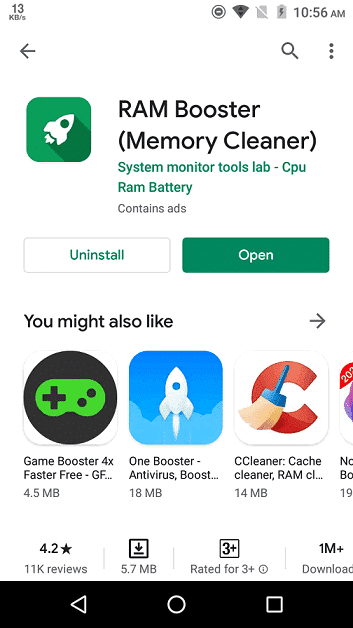
STEP 2: After installing the app open it and you will find an interface like this

STEP 3: You will find on the top that how much ram is Freeable, then you will see
overall storage usage, overall ram usage
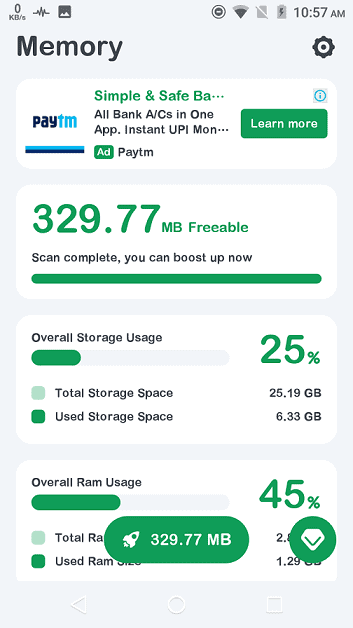
STEP 4: Scroll down then you will find a RAM usage graph, this will show that how your smartphone uses your ram

STEP 5: Scroll up and at the bottom center of the screen you will find a button that displays the ram that is freeable, click on that.

STEP 6: There will be a pop up in which you will be shown the apps that will be
closed by the RAM Booster app, then click on the rocket sign.
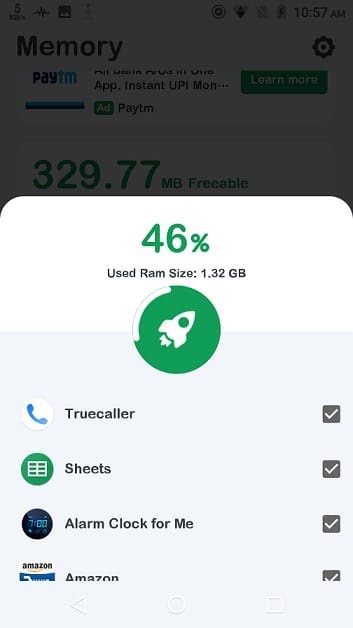
STEP 7: It would take a few seconds and you are now ready to go with your boosted phone.
 TechWith_Gautam